 Lorenzo Dal Col
Should the Agent Do It, or Write a Script?
There are two ways I hand a coding agent a job with more than a couple of steps. One is to just let it go: it reads files, runs commands, looks at what came back and decides what to do next, until it says it's done. The other is to have it write a script that does the same job, read the script, and run the script myself.
The agent does it
- I ask it to check that no link on the site is broken.
- It fetches the home page, then every page it finds, reading all that HTML into its context.
- It takes a few minutes and a lot of tokens.
- It decides what counts as broken as it goes. A 202 might get waved through.
- I get a summary in prose. If it missed something, the summary reads the same.
- Next time, it works the whole procedure out again, maybe differently.
The agent writes a script
- I ask it to write a script that checks the links.
- I read the script once.
- I run it. A few seconds, same answer every time.
If it's something I'll only do once, it hardly makes a difference which. If I'll do it again, it makes a big one, mostly in what happens when something goes wrong. Three examples: two from building this site, one from my work on the conformance test suite.
Example 1: checking links
Before I push changes I want to know that no internal link or image is broken. I could just ask the agent to crawl localhost and check. It would do it, too: fetch the home page, find the links, fetch those, find more, and after a few minutes tell me what it found. Along the way it would have read a lot of HTML it doesn't need, and the next time I asked it would have to work the whole procedure out again.
So instead I had it write scripts/check-links.py. It's about 130 lines of
Python: start at /, follow every internal href and src, print anything
that doesn't come back as HTTP 200. It runs in a few seconds and gives the same
answer every time. If I want to know what "checked" means, I can open it and
read. It doesn't need the agent to run.
It's not a clever script. The other day it told me the link to my 2011 paper on IEEE Xplore was broken. It wasn't. The DOI redirected fine, but IEEE answers anything that looks like a script with a 202 instead of the article page, and 202 isn't 200, so into the report it went. I checked the DOI record, it pointed at the right paper, done. I'm fine with that. The script was wrong in a way that took me a minute to check.
An agent doing the same crawl might well look at that 202 and decide it's probably fine. Often it would be right. When it's wrong I'd never know, because the summary it writes me reads the same either way.
Example 2: screenshots at phone width
I wanted a screenshot of every page at 375 pixels wide, to check the layout on a phone. The agent's first go was headless Edge from the command line with a phone-sized window (Edge because that's what was installed on the machine). The screenshots came back with the text cut off on the right. It took a while to see why: headless Edge won't lay out a page narrower than about 500 pixels, whatever width you ask for. It had rendered at 500 and cropped the picture to 375.
So I had the agent write a script instead, about 60 lines of Node. The script starts Edge with remote debugging on, talks to it over the DevTools protocol, switches on proper mobile emulation, and for each page saves a full-page capture plus one line saying whether anything sticks out past the viewport. That fixed the width.


Then the long portfolio page came back with its lower images blank. Lazy loading, said the agent, and added a scroll before the capture. Still blank. What sorted it out was having the script print the load state of each image. All twelve were loaded. Lazy loading had nothing to do with it; the blanks came from capturing a page over 5000 pixels tall in one go, and making the emulated screen as tall as the page fixed it.
I think the agent would have kept patching around the lazy-loading theory for a good while if I'd let it. Twelve lines of output from the script settled it in one go.
Example 3: splitting the work
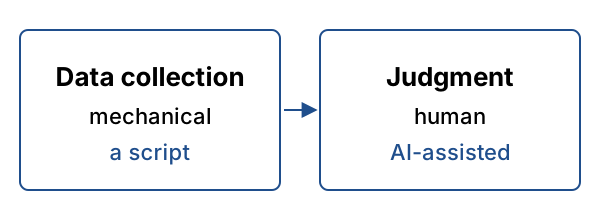
Most of the tasks I actually care about have a mechanical part and a judgment part. Take issue triage on the conformance test suite. Getting the list of issues that changed since I last looked is mechanical. Working out which of them need something from me is not; that's reading messy text written by people in a hurry.
So I split it. I had the agent write a script that fetches the issues and prints one line of JSON per issue. The agent then reads that and does the judging, nothing else.
The script half, simplified a lot, is this:
for issue in tracker.list_issues(updated_since=last_run):
    print(json.dumps({
        "id": issue.id,
        "title": issue.title,
        "assignee": issue.assignee,
        "last_comment_by": issue.comments[-1].author if issue.comments else None,
        "labels": issue.labels,
    }))
The agent gets a page of JSON instead of a stack of issue pages full of markup, so its context stays small and all of it goes on the question that needs a model. The fetching never changes between runs. The judging can, and that's the part I read.
How I decide
| Agent does it | Agent writes a script | |
|---|---|---|
| Cost per run | Tokens and minutes | Almost nothing |
| When it breaks | Confident summary | Error in the output |
| What I review | Every run | The script, once |
If I'll do a task again, or there are more than a handful of items, I have the agent write a script. Same if the answer has to be exactly right. If every item needs a judgment call on messy input, I let the agent do it. Most of what I do ends up as some of each.
Two more things I've learned to do. When a script fails I don't let the agent fiddle with it until it passes, because sometimes the failure is the right answer; the DOI above is one. And when a script prints a number I read the number myself instead of asking the model what it says.
I help teams set up this kind of AI workflow on production codebases. See services.