 Lorenzo Dal Col
Why I am not a fan of MCPs
An MCP server gives a coding agent a fixed set of tools that someone else chose to wrap. For most of what I do I'd rather give the agent a shell, the CLI and the REST API, and let it work out the calls. That costs more tokens. It also lets the agent ask questions the server's author never thought of, which tend to be the ones I have.
The short version:
- An MCP server only lets the agent ask what its author wrapped. With the CLI and REST it can reach the whole API, undocumented endpoints included.
- Its tool definitions take up the model's context in every session, used or not. A CLI costs nothing until the agent runs it.
- An MCP server clearly wins where there is no usable CLI or API: desktop apps, and web apps that are only a UI. Driving those through screenshots or page HTML costs more tokens than a few tools that expose the app's actions.
- It can also keep an agent read-only, which a CLI login token can't, and it's the only way in where there's no shell.
Example: counting deploys
My sites run on Netlify, where every production deploy costs credits from a
monthly allowance, and I wanted the agent to tell me before each push how
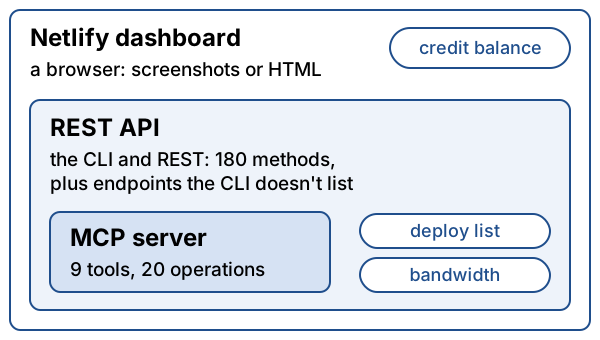
many were left. Netlify's CLI was already installed. netlify api wraps
their REST API, so one call gave the plan's credits and the billing period
and another listed every deploy with its state and build time. There is no
usage command, so the agent took the login token from the CLI's config file
(I hadn't asked it to) and guessed at about twenty REST endpoints. Most came back 404; one of the
few that answered had the bandwidth for the period. The balance itself is in
no API at all, only in the dashboard, so the agent rebuilt it from deploys
and bandwidth in a short Python script that now runs before every push.
Then I had the agent try Netlify's official MCP server on the same question. It has nine
tools. The two for deploys both need a deploy ID you already have, so it
can't list them, and there is nothing for usage. I assumed get-team would
at least return the plan's credits, since it reads the same account. I was
wrong. It returns eight fields, none of them the credits or the billing
period.
Where the CLI and REST are better
The first case is the one above: any question the server's author didn't think to wrap. With a shell the agent reaches the whole API, endpoints the CLI doesn't list included, and when the answer isn't anywhere it can rebuild it from what is, as it did with the balance.
The second is what the tools cost before you use them. An MCP server's tool
definitions go to the model at the start of every session, whether or not
the session touches Netlify. Theirs come to about 13,000 characters. Some clients defer loading them
until they're used; not all do. A CLI costs nothing until the agent runs
--help.
Where an MCP is better
The main case is software with no API, only a GUI or a web page. The credit balance is like that: it's only in Netlify's dashboard. An agent can get there with a browser, but every step costs a page of HTML or a screenshot, and a dashboard takes a lot of steps. Here the token argument flips, and a server with a few tools for the app's actions is much cheaper. Netlify's doesn't expose the balance either, but that's what an MCP server is for.
The other case is limits. The token the agent used for the REST calls is my
CLI login, and it can do anything my account can: netlify api lists 180
methods, deleteSite and cancelAccount among them. Netlify's MCP server
splits its tools into readers and updaters and can't delete a site at all.
For an agent working unwatched I'd allow the reader tools only. Permission
rules on CLI commands don't do the same job, since the agent can call the REST
API directly, as it did here.
I expected a third case and didn't get one. Netlify's server ships coding guidance, and its notes on forms cover the file whose deletion once broke a build of a site I look after. The same facts are in the public docs and in the build error, which is where the agent found the fix.
Side by side
| MCP server | CLI and REST | |
|---|---|---|
| What the agent can ask | What the author wrapped | The whole API, undocumented endpoints included |
| Cost before it's used | Tool definitions in every session | Nothing until --help |
| Apps with only a GUI or web UI | A few tools for the app's actions | Screenshots or HTML at every step |
| Can be made read-only | Yes, by allowing only reader tools | Not really; the token can do anything |
All of this assumes an agent with a shell, good enough to read --help and
guess at a REST API. In a chat app with no shell the MCP server is the only
way in, and a smaller model will probably do better with nine fixed tools
than with 180 methods.
I help teams set up AI-assisted engineering workflows, MCP tooling included. See services.